What is Contract Automation? Workflow and Benefits
10/05/2026
12 min read

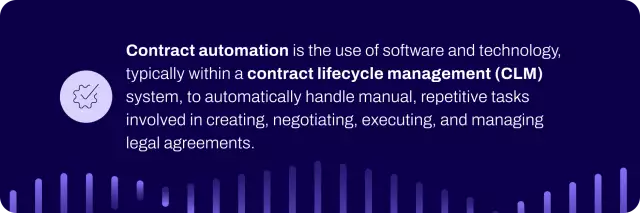
Contract automation is the use of technology to generate, review, approve, execute, and manage deals with minimal manual effort. By automating repetitive tasks throughout the entire agreement lifecycle, your team can speed up processes, reduce errors, and ensure consistent, compliant deals across your organization.
This guide will explore how automated contract workflows work, the benefits they deliver across every department, and the key features to look for when selecting a platform. The right solution can help transform your agreement management from a bottleneck into a competitive advantage.
Key highlights:
- Contract automation is the process of replacing manual agreement tasks with guided, digital workflows that keep deals compliant and on schedule.
- Automated contract workflows eliminate manual process inefficiencies by standardizing templates, intelligently routing approvals, and centralizing data.
- Conga CLM provides contract workflow automation capabilities that enterprises need, offering self-service creation, centralized visibility, and seamless integrations that accelerate cycles and strengthen compliance.
Why You Need Contract Management Automation
Contract management automation eliminates friction points that slow the agreement lifecycle, while also reducing unnecessary risk. By replacing fragmented, manual steps with structured contract workflows, you can improve accuracy, visibility, and cross-functional collaboration.
These are typical contract management challenges that automation solves:
- Slow workflows: contracts must pass through many stages, including drafting, review, redlining, approvals, and signature, turning simple requests into lengthy cycles that stretch for days or weeks
- Duplication of work: teams enter contract details into multiple systems (CRM, ERP, and repositories), creating duplicate work and increasing the risk of inconsistencies
- Siloed contract data: agreements are spread across inboxes and shared folders, making it difficult to find the latest version or understand obligations and risks
- Overwhelmed legal teams: lawyers spend hours generating routine non-disclosure agreements (NDAs), fixing formatting, or checking clauses instead of focusing on strategic work
- Inconsistent processes: without unified workflows, teams may follow different steps, leading to missed approvals, untracked edits, and compliance issues
How Does Contract Automation Work?
Agreement automation relies on software, such as a contract lifecycle management (CLM) tool, to execute predefined workflows, apply business rules, and integrate data across systems without requiring manual input at each step. This technology handles routine tasks, such as populating templates, routing approvals, sending reminders, and updating repositories so that teams can focus on strategic decisions.
Here’s a quick comparison of manual versus automated workflows across key capabilities, to help you understand how automation improves enterprise contract management processes:
| Capability type | Manual contract workflows | Automated contract workflows |
| Contract lifecycle speed | Slow, sequential steps that depend on email, manual reviews, and unstructured handoffs | Predefined workflows, automated routing, and real-time notifications to drive faster, streamlined progression |
| Contract risk and accuracy | Higher risk of errors, missed clauses, outdated templates, and compliance gaps due to inconsistent processes | Improved accuracy and lower risk through standardized templates, rule-based approvals, and automatic validation |
| Contract visibility | Limited visibility with documents scattered across folders, inboxes, and individual devices | Centralized, searchable records with insights into status, contractual obligations, deadlines, and version history |
| Task management | Spreadsheets, email reminders, and individual follow-ups to manage tasks and deadlines | Automatically triggered tasks with reminders, assignments, and progress tracking built into the workflow |
The Best Automated Contract Workflows
The best automated contract workflow depends on your organization’s goals, deal types, and cross-functional needs.
Here’s how each department can leverage contract automation:
| Department | Team-specific benefits of contract automation | Best automated contract workflows |
| Legal |
|
|
| Sales |
|
|
| Finance |
|
|
| Procurement |
|
|
| Business operations |
|
|
| IT |
|
|
Automated Contracts: 4 Key Benefits
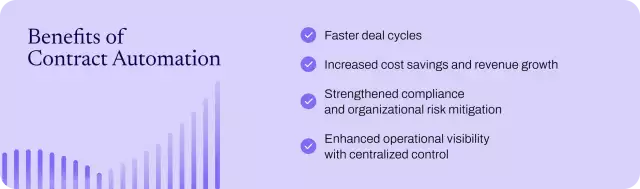
WorldCC says that 81% of organizations want to implement contract automation, reflecting a strong recognition that these tools streamline processes, reduce delays, and lower compliance risk. Four key benefits make the case for adoption:
1. Faster deal cycles
Automated contract workflows accelerate deal cycles by removing the slow, sequential steps that depend on manual reviews and disconnected systems. Take the example of Cotality, which was struggling with a legacy system that captured only basic metadata and offered little visibility into process gaps or contract status. After implementing Conga CLM, they were able to automate templates, predefine workflows, and enable real-time tracking. And now:
- Sales reps can produce compliant agreements directly from Salesforce.
- The system routes approvals to legal, product, or security teams only when exceptions are necessary.
- The legal team is freed from routine, low-value contract tasks, such as standard approvals, template reviews, and basic compliance checks.
Conga’s contract management automation reduced Cotality’s agreement cycle time by 75%, enabling the team to respond to RFPs more quickly, close more deals, and deliver a stronger customer experience.
2. Increased cost savings and revenue growth
Automated contracts boost the bottom line by cutting operational costs, preventing revenue leakage, and creating new profit opportunities. It turns the agreement portfolio from a cost center into a value driver, generating efficiencies that grow across the organization.
Forrester’s Total Economic Impact™ report highlights the financial benefits. Organizations that use Conga CLM to automate contract management workflows achieved a 294% ROI and a net present value (NPV) of $14.4 million. Results included:
- Reduced costs: for legal and contract teams, Conga CLM decreased labor from 25 hours to 15 hours per contract, freeing staff to focus on higher-value work.
- Recovered revenue from renewals: automated alerts and structured workflows prevent missed deadlines, allowing teams to renegotiate terms and capture upsell opportunities before a contract renews automatically.
- Minimized financial risk: organizations that implemented Conga CLM saw the proportion of contracts at risk of noncompliance drop from 3% to 1.4%, helping legal teams protect revenue and avoid penalties.
3. Strengthened compliance and organizational risk mitigation
Contract automation reduces compliance risk by enforcing standardized language, tracking regulatory requirements, and maintaining complete audit trails for every agreement. With Conga CLM, for example, you can automate template generation to ensure consistent, jurisdiction-specific legal language.
Case in point: Molina Healthcare faced siloed systems, manual approvals, and inconsistent contract language. After implementing Conga’s solution, they gained automated workflows that ensured correct legal language and centralized visibility into risk and obligations. Key outcomes included:
- Enhanced regulatory compliance and governance through automated workflows that ensured proper legal language and tracked approvals across all contracts.
- Improved visibility into risk and contract requirements through centralized storage, enabling the team to spot trends and clauses that could put the organization at risk.
Keep learning: why legal compliance and obligation management are so important
4. Enhanced operational visibility with centralized control
Instead of relying on teams to update spreadsheets or chase updates via email, contract management automation keeps agreement data current, accurate, and searchable in real time. This approach gives leaders instant access to the agreement intelligence they need—contract status, obligations, renewal dates, financial terms, and ownership.
Peloton Consulting Group, for example, struggled with fragmented, manual tracking methods that made it difficult to see agreement status, signature progress, or ownership of next steps. By implementing Conga CLM, they automated contract intake and tracking, gained centralized visibility, and executed 256 contracts in just seven months, roughly the same volume as in the previous 12 months.
Key outcomes included:
- Automated contract tracking and reporting: workflows and system updates keep deal status current without manual effort, enabling teams to view progress, generate reports, and share insights across sales and leadership.
- Streamlined cross-team collaboration: automated assignments and reminders keep responsibilities clear, enabling teams to complete tasks on time and reduce slowdowns across the lifecycle.
How to Automate Contracts with a CLM Solution
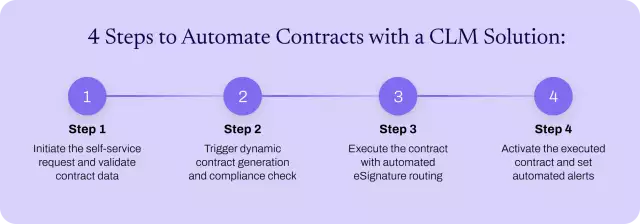
When you automate contracts with a CLM solution, you need to define workflows, apply business rules, and use templates to handle routine tasks automatically. Conga CLM lets you automate contracts in four structured steps:
Step 1: Initiate the self-service request and validate contract data
A salesperson or business user starts the contract management workflow automation via a simple, guided form on their portal or CRM. Simply enter key agreement details such as the counterparty's name and region. The system then immediately checks this data against business rules and confirms that the user has filled all required fields before allowing the request to proceed.
Step 2: Trigger dynamic contract generation and compliance check
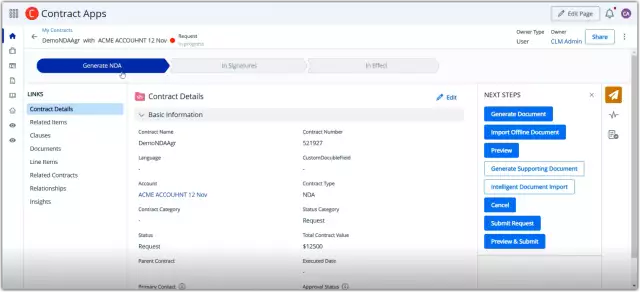
Once you submit the contract record, the validated data automatically triggers the document generation activity. Then it’s time for the CLM system to populate a pre-approved template, inserting the correct party information, effective dates, and the appropriate jurisdiction-specific legal clauses from a governed library.
Step 3: Execute the contract with automated eSignature routing
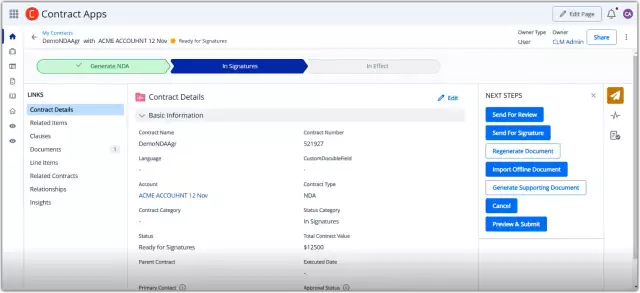
With the automated contract management system generating the document, the agreement moves straight to the signature stage. A single click initiates execution, sending structured email notifications first to the internal approver and then to the external signatory. The initiator tracks status in real time, while the system sends reminders and supports both electronic and wet signature processes until the user returns and uploads the signed document.
Read more: how to sign a PDF with an eSignature
Step 4: Activate the executed contract and set automated alerts
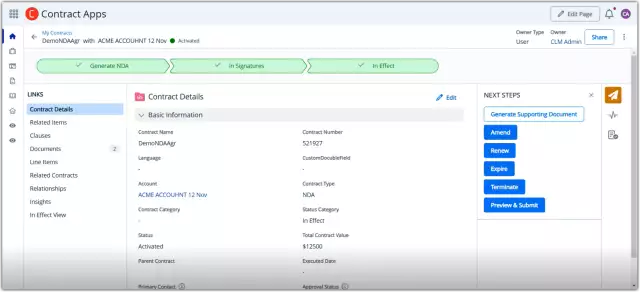
After the parties sign the contract, Conga CLM activates the uploaded document and moves the agreement to an In Effect status in the centralized repository. The system also generates a complete audit trail and sets intelligent alerts based on the terms of each deal, helping the team track key expiration and renewal dates and proactively manage obligations without relying on manual calendar tracking.
The Best Contract Automation Software Features
The best automated contract management solutions combine document creation, workflow management, collaboration features, and analytics. Look for these CLM automation features:
| Stage of the contract lifecycle | Contract automation software feature | Business impact |
| Creation | Self-service, pre-approved contract templates | Ensure legal compliance and brand consistency from the first draft by providing a standardized starting point for all agreements |
| Guided contract request through dynamic forms | Eliminate back-and-forth clarification and accelerate intake by capturing high-quality, structured data at the point of request | |
| Conditional clauses | Mitigate risk and maintain governance across every contract through the consistent application of approved legal language | |
| Clause library | Standardize contracts, enforce governance, and streamline drafting with a centralized repository of pre-approved legal language | |
| Document generation | Cut drafting time from hours to seconds by instantly creating error-free first drafts using validated data pulled into templates | |
| Collaboration and negotiation | Real-time redlining and collaboration | Reduce version confusion and email clutter with faster negotiation cycles and a single source of truth |
| AI-powered risk assessment | Empower negotiators and conserve legal resources by proactively identifying non-standard or risky clauses against your playbook | |
| Approval and execution | Customizable workflows automations | Remove approval slowdowns and ensure speed and accountability through routing that matches your business rules |
| Integrated eSignature | Accelerate revenue recognition and improve the signer experience by providing a streamlined path from final draft to fully executed contract | |
| Escalation paths and exception routing | Keep every contract moving forward by automatically handling stalled approvals through re-routing tasks to managers or alternate delegates | |
| Repository and analytics | Centralized, searchable contract repository | End time-consuming document hunts and provide immediate, secure access to the complete contract portfolio for any authorized user |
| Custom reports and contract dashboards | Enable strategic decisions and process improvements through data-driven visibility into cycle times, clause usage, and portfolio health | |
| Obligation management | Ensure compliance and maximize value by providing reliable oversight of all committed deliverables, service levels, and payment terms | |
| Automated alerts for renewals, expirations, and milestones | Prevent revenue leakage from missed renewals and penalties through active contract management of critical dates | |
| Audit and compliance | Complete audit trails and version history | Reduce compliance risk and simplify internal and external audits with a defensible record of every action, edit, and approval |
| Contract ecosystem | Pre-built integrations with CRM, ERP, and business apps | Replace manual entry, ensure accuracy, and connect contracts to core business processes through synchronized data flow across systems |
| Common document editors integration | Support user adoption without sacrificing version control or security through frictionless editing within familiar tools such as Microsoft Word |
Keep learning: 10 must-have contract management software features
Leverage Conga CLM for Effective Contract Workflow Automation
If you’re considering contract automation software, you’ve already felt the impact of manual work: slow drafting, backlogged reviews, and scattered agreement data. Conga CLM addresses those gaps by tying creation, negotiation, execution, and post-signature tracking into one connected workflow.
Our CLM platform strengthens your contract workflow automation through:
- Automated and standardized contract creation: generate compliant contracts in minutes with pre-approved templates, clause libraries, and CRM/ERP data.
- Accelerated negotiation with contract intelligence: compare third-party agreements to your playbook, flag risks, and apply approved language instantly.
- Centralized control and insight: store all contracts in one secure, searchable repository for full visibility, powerful search, and reliable reporting and obligation tracking.
- Integration with your business ecosystem: sync contract data with Salesforce and major ERPs, remove silos, automate downstream workflows, and connect agreements to every revenue-impacting process.
Ready to automate your contracting process? Contact our sales team.
Frequently Asked Questions
-
How can I automate the process of sending contracts and invoices to clients?
To automatically send contracts and invoices to clients, configure a CLM workflow that integrates document generation with your billing cycle. Follow these steps:
- Trigger the workflow automatically upon final contract approval and execution.
- Generate the invoice by pulling the correct payment terms and amounts directly from the executed contract data.
- Send documents in a single sequence with a timed email that delivers both the finalized contract and the corresponding invoice to the client.
- Ensure accuracy and efficiency by integrating your CLM, billing software, and email systems, eliminating manual handling and data entry errors.
-
How do teams automate supplier follow-ups and contract renewals?
To automate supplier follow-ups and contract renewals, configure your CLM system to manage key dates and run a structured, time-based process:
- Extract and monitor key dates, such as expiration and renewal notice periods, as soon as a supplier contract is created or uploaded.
- Schedule automated email reminders to the responsible manager at predetermined intervals (for example, 90, 60, and 30 days before a deadline).
- Generate renewal documents automatically by creating a new contract version from a pre-approved template when the renewal period begins.
- Initiate approval workflows to route the renewal agreement through the necessary internal contract reviews, ensuring timely and compliant management.
Watch our renewal management demo to see how this automated process works in Conga CLM.
-
How do I automate contract amendments?
To automate contract amendments, configure your CLM to manage amendments as distinct, traceable events linked to the original agreement. Here’s how:
- Initiate the request through a digital intake form where a business user specifies the required change.
- Generate a draft amendment automatically by pulling data from the master contract into a pre-approved template.
- Route for approval with a tailored workflow that ensures the correct legal and business stakeholders review contract changes.
- Execute and link the amendment with an integrated eSignature tool, then file the final document in the repository, and the system automatically links it to the original contract for a complete audit trail.
-
How to Shorten Your Sales Cycle: Fix the Handoffs, Not the Hustle BlogAIHow to Shorten Your Sales Cycle: Fix the Handoffs, Not the Hustle
Learn how to shorten your sales cycle by removing the hidden friction between teams, pricing, approvals, contracting that stalls deals right when they should close.07/24/20269 min read -
Stop Guessing & Start Deciding: The Forrester Framework for Buy vs. Build Analyst ReportIndustry InsightsStop Guessing & Start Deciding: The Forrester Framework for Buy vs. Build
AI lowered the cost of building software. It didn't lower the cost of running it. Get the Forrester framework that helps you decide what to buy, build, or generate.07/22/20264 min read -
Only the Agile Thrive BlogIndustry InsightsOnly the Agile Thrive
Discover how business agility, AI, and connected data help companies respond faster to tariff disruptions, reduce risk, and make confident go‑to‑market decisions.07/22/20265 min read -
Why AI-Powered Pricing is Now a Business Necessity for Margin and Growth BlogAIWhy AI-Powered Pricing is Now a Business Necessity for Margin and Growth
Learn why AI pricing is becoming essential for businesses facing rising market volatility, increased pricing pressures, and growing need for agility.07/16/20267 min read