The Best Document Automation Software to Choose in 2026
09/03/2026
15 min read

8.2B
market in 2025, reaching $18.7B by 2034
69%
of organizations integrate document generation with CRM, ERP
11 document automation platforms compared for enterprise fit
Composer generates 10M+ documents monthly for 8,000+ customers
Without a modern document automation solution, many organizations spend more time formatting proposals, chasing approvals, and re-keying account data than on the work that moves a deal. At enterprise volume, teams generate thousands of documents a month across sales, legal, finance, and service, and every manual handoff adds a chance for an error to reach a customer.
This buyer's guide compares 11 document automation platforms based on factors like data integration, output formats, native signing, and enterprise fit. Equipped with these side-by-side comparisons, you can build your shortlist with confidence.
This comparison table highlights our top five picks. Keep reading for the full breakdown of every tool, plus the criteria to weigh when choosing.
| Document Automation Solutions | Best for | Primary Use Case | Standout Differentiator |
| Conga Document Automation | Enterprise-scale generation and signing | High-volume document generation from CRM or ERP data | Unified generate-to-sign loop across Composer and Sign |
| Docusign | Signature-first agreement workflows | Agreement signing and tracking | Name recognition and a large integration catalog |
| PandaDoc | Small and midsize sales documents | Proposals and quotes | All-in-one sales documents with a drag-and-drop editor |
| Formstack Documents | No-code, data-to-document generation | Template-based generation from connected data | No-code builder across DOCX, PPTX, PDF, and CSV |
| Experlogix Document Automation | Complex, regulated documents | Compliance generation at scale | Low-code engine for complex templates and logic |
See enterprise-grade document generation in action with Conga
What Is Document Automation Software?
Document automation software is a platform that merges live data from your systems of record, such as a CRM, ERP, or database, into approved templates to generate accurate, on-brand documents, then routes them through execution, including delivery and eSignature. You build the template and business rules once, then the software generates contracts, quotes, or invoices on demand or in batches and moves them from creation to signed record without manual handoffs.
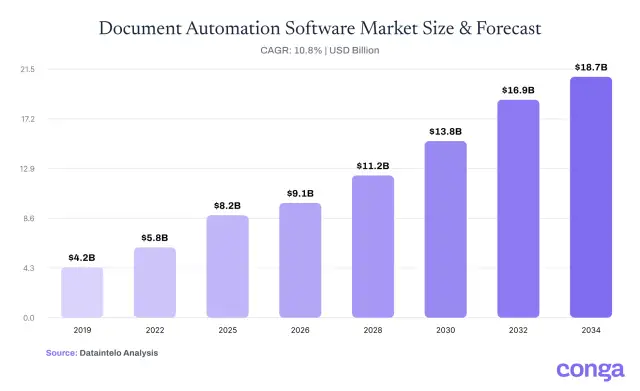
Enterprises implement these automation tools because manual document creation simply doesn't work at scale. According to Dataintelo, the global document automation software market reached $8.2 billion in 2025 and is projected to hit $18.7 billion by 2034, a 10.8% compound annual growth rate (CAGR). That growth reflects rising document volumes and compliance demands that copy-paste workflows can't meet
11 Top-Rated Document Automation Tools
The right platform depends on where your documents originate, how many you produce, and whether you need signing and compliance in the same system. Here are 11 top-rated document automation tools, each mapped to the type of buyer it fits best.
1. Best document automation software for enterprise-scale generation and signing: Conga Document Automation
Conga Document Automation is a unified, enterprise-grade solution that pairs Conga Composer for document generation with Conga Sign for eSignature. With Conga's document automation tools, teams can create, deliver, and execute agreements from one system.
- Real-time data from any CRM, ERP, or system of record, merged from multiple sources into one file
- Multi-format output in PDF, Word, Excel, PowerPoint, or HTML with branding, formatting, and formulas intact
- Conditional logic, data grouping, and time- or event-triggered batches for high-volume, complex documents
What sets Conga apart is scale and reach. More than 8,000 customers rely on Composer to generate over 10 million documents per month. Conga is used in 60+ countries and trusted by over half of the Fortune 50. Our API-first design embeds generation and signing into the portals, apps, and workflows teams already use, so a quote becomes a signed record without leaving the system.
Built for: Enterprise teams generating high volumes of documents from CRM or ERP data that need signing and governance in one platform
| Conga Pros | Conga Cons |
|
|
Watch a two-minute walkthrough of the document generation process with Conga.
2. Best document automation solution for signature-first agreement workflows: Docusign
Docusign is an agreement platform focused on the signing end of the process. Through its Intelligent Agreement Management (IAM) suite, teams can send, sign, and track documents, with a no-code Workflow Builder for routing and contract lifecycle management (CLM) for managing agreements.
Docusign offers document generation as a paid add-on within its eSignature REST API, merging data into DOCX templates at the point of sending. It's built to personalize agreements inside the signing workflow.
Built for: Teams that prioritize eSignature and agreement tracking over high-volume document generation
| Docusign Pros | Docusign Cons |
|
|
3. Best document automation tool for PDF-centric signing: Adobe Acrobat Sign
Adobe Acrobat Sign is the eSignature layer of Adobe's Acrobat and Document Cloud ecosystem, built around PDFs. Teams can send documents for signature from inside Microsoft Word, Salesforce, or Workday, with bulk send, payment collection, and audit-trail tracking. Signed records are stored in Document Cloud or connected cloud drives.
Adobe document creation centers on fillable PDF forms. Teams needing data-driven generation across Word, Excel, or PowerPoint typically add a dedicated engine.
Built for: Teams working primarily in PDFs that need eSignature across the Adobe and Microsoft ecosystem
| Adobe Acrobat Sign Pros | Adobe Acrobat Sign Cons |
|
|
4. Best document automation system for SMB proposals and quotes: PandaDoc
PandaDoc is a sales-focused document platform for proposals, quotes, contracts, and eSignature. A drag-and-drop editor, reusable templates, configure, price, quote (CPQ) pricing tables, and CRM integrations help teams create and close in one place, backed by SOC 2, HIPAA, and GDPR compliance.
Built for: SMB and mid-market sales teams producing proposals, quotes, and contracts tied to their CRM
| PandaDoc Pros | PandaDoc Cons |
|
|
5. Best software for no-code, data-to-document generation: Formstack Documents
Formstack Documents (formerly WebMerge) is a no-code tool that merges data into DOCX, PPTX, PDF, or CSV files. Teams can upload templates or build them with an AI builder, pull data from CRMs, forms, and databases through integrations or the API, and deliver via Formstack Sign, a CRM, or storage. It offers encryption and HIPAA compliance.
eSignature runs through the separate Formstack Sign product, and some reviewers note a learning curve on complex merges.
Built for: Teams that want no-code, document generation from existing templates and connected systems
| Formstack Documents Pros | Formstack Documents Cons |
|
|
6. Best document automation solution for Salesforce-native documents: OmniStudio Document Generation
OmniStudio Document Generation (formerly Vlocity) is Salesforce's native engine for producing documents from Salesforce data. It creates contracts, proposals, quotes, and reports from Word and PowerPoint templates, using Data Mappers and conditional, repeating tokens, with client-side, server-side, and batch generation.
The solution runs entirely inside Salesforce, so setup needs the OmniStudio managed package, add-on licenses, and admin or developer work. It has no native eSignature.
Built for: Salesforce-centric teams generating documents directly from Salesforce data inside the platform
| OmniStudio Document Generation Pros | OmniStudio Document Generation Cons |
|
|
7. Best tool for no-code document generation: Nintex DocGen
Nintex DocGen is the document automation piece of the Nintex process automation platform, pre-built to run in Salesforce and Nintex Automation CE. It merges data from CRMs, ERPs, and legacy systems into templates to generate Word, Excel, PowerPoint, and PDF documents. No-code, drag-and-drop workflows then route each document for review or Nintex eSign.
The platform works best for teams building document steps into broader Nintex or Salesforce workflows. Some reviewers note setup complexity and a learning curve on advanced automation.
Built for: Teams automating document generation inside Nintex or Salesforce workflows without code
| Nintex DocGen Pros | Nintex DocGen Cons |
|
|
8. Best software for complex, regulated documents: Experlogix Document Automation
Experlogix Document Automation (formerly Xpertdoc) is a low-code platform for complex, high-compliance document processes. It uses intricate templates, conditional logic, and multi-source data to generate PDF, Word, and Excel documents on demand or in bulk, with eSignature and approval workflows. Connectors reach Dynamics 365, Salesforce, SugarCRM, and ERP or CPQ systems.
Built for: Regulated enterprises generating complex, high-volume documents from CRM and ERP data
| Experlogix Document Automation Pros | Experlogix Document Automation Cons |
|
|
9. Best document automation system for security-first government delivery: Inkit
Inkit is a security-first document generation platform for compliance-heavy and government work. It produces Word, Excel, PDF, and HTML documents from templates and data, with batch generation, version control, and audit-ready retention. On security, it is SOC2 and HIPAA certified, with IL4/IL5 Department of Defense authorization.
Built for: Government and compliance-driven teams generating and delivering sensitive documents
| Inkit Pros | Inkit Cons |
|
|
10. Best document automation solution for legal template assembly: HotDocs
HotDocs, part of Mitratech, is a document assembly tool built around templates and guided interviews. Users answer a questionnaire and rules-based logic assembles documents with conditional, jurisdiction-specific clauses. It handles batch generation, version control, an open API, and no-code template building on desktop or cloud.
Built for: Legal and compliance teams assembling template-driven documents with conditional logic
| HotDocs Pros | HotDocs Cons |
|
|
11. Best document automation tool for inbound data extraction: Docsumo
Docsumo is an intelligent document processing (IDP) tool focused on the inbound side, extracting and validating data from documents rather than generating them. AI agents classify incoming files and pull fields and tables from invoices, bank statements, ACORD forms, and 250+ document types. Extracted data is cross-checked against business rules, then routed to systems of record. Docsumo carries SOC 2 Type 2, GDPR, and HIPAA compliance.
Built for: Finance, lending, and insurance teams extracting and validating data from high volumes of inbound documents
| Docsumo Pros | Docsumo Cons |
|
|
What Features Should I Look for in a Good Document Automation Tool?
The best document automation software features connect generation to your data, output formats, signing, and compliance in one system. Seven areas decide whether a platform holds up at enterprise volume or stalls on complex templates and integrations.
| Document Automation Software Feature | What to Look for | Why It Matters |
| 1. Template management and conditional logic | Reusable templates in Word, PDF, Excel, and PowerPoint, with conditional sections, dynamic tables, row burning, and version control | Accurate, on-brand documents that follow approved business rules without manual editing |
| 2. CRM, ERP, and data integration | Prebuilt connectors or APIs across CRM, ERP, HRIS, and CPQ, with live merging of multiple sources into one document | Connected, up-to-date records with no copy-paste or duplicate entry |
| 3. Multi-format output | Native PDF, DOCX, XLSX, PPTX, and HTML from a single template, with no broken formatting or formulas | One engine for every asset, from financial spreadsheets to board-ready reviews |
| 4. High-volume generation | Batch, scheduled, and event-triggered runs that stay stable at enterprise scale | Reliable output during peak billing, campaign, and seasonal windows |
| 5. Native eSignature and tracking | Built-in signing rather than a third-party add-on, plus secure delivery, status tracking, and signed-document sync back to source systems | A single generate-to-sign loop with full visibility and no manual uploads |
| 6. Embedded and API deployment | REST APIs, prebuilt connectors, and embedding inside web apps, portals, and customer self-service pages | Documents created inside the systems where teams and customers already work |
| 7. Security, compliance, and governance | Role-based permissions, encryption, audit trails, white-labeling, and SOC 2, GDPR, and HIPAA support | Protected data, audit-ready governance, and phishing-safe, on-brand documents |
How to Choose the Best Document Automation Platforms for Large Enterprises
Choosing among the best document automation platforms for large enterprises comes down to fit. Match the platform to your data, volumes, signing, and compliance needs, not to a feature checklist.
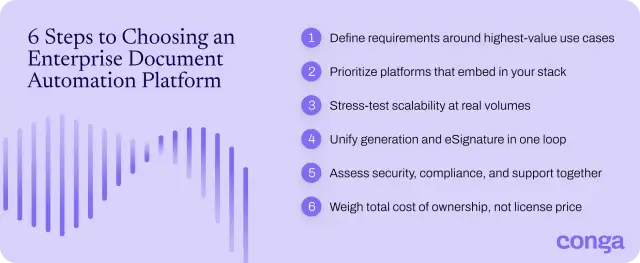
Work through these six steps as you navigate the selection process:
- Define your requirements around the highest-value use cases: Start with the documents that move revenue or carry risk, such as quotes, contracts, and regulated filings. Then map the data sources, formats, and approvals each one needs.
- Prioritize platforms that embed in your existing stack: Generate documents inside the systems teams already use. Nearly 69% of organizations integrate document generation tools with CRM and ERP platforms, according to Business Research Insights, so favor prebuilt connectors and REST APIs that pull live data without re-entry.
- Stress-test scalability and performance at your real volumes: Run batch, scheduled, and event-triggered jobs at your peak numbers, not a light demo dataset. After that, confirm the platform stays stable during billing runs and seasonal spikes.
- Choose a unified generation-to-signature loop, not a stitched-together stack: Favor native generation and eSignature in one system, so a document moves from data to signed record without manual uploads. Each extra tool adds handoffs, cost, and points of failure.
- Assess security, compliance, and vendor support together: Require role-based permissions, encryption, audit trails, and the SOC 2, GDPR, or HIPAA coverage your industry demands. Weigh implementation and ongoing support in the same decision.
- Weigh total cost of ownership, not license price: Count implementation, integration, training, and maintenance alongside the subscription price. A cheaper license that needs heavy configuration often costs more over the life of the contract.
Aligning finance, legal, and IT early on these criteria, and on the benefits of document automation, keeps the evaluation consistent.
This comparison recaps our top solutions across the factors that are most important for enterprise evaluations.
| Document Automation System | Best Use Case | Core Function | Native eSignature | Type of Integration |
| Conga Document Automation | Enterprise-scale generation and signing | Generate-to-sign document automation | Yes (Conga Sign) | API-first; any CRM, ERP, or portal |
| Docusign | Signature-first agreement workflows | eSignature and agreement management | Yes | 1,000+ prebuilt integrations and API |
| Adobe Acrobat Sign | PDF-centric signing | PDF eSignature and forms | Yes | Microsoft, Salesforce, Workday, cloud drives |
| PandaDoc | Small and midsize proposals and quotes | Sales document creation and signing | Yes | CRM integrations and API |
| Formstack Documents | No-code, data-to-document generation | No-code document generation | Via separate Formstack Sign | 150+ integrations and Documents API |
| OmniStudio Document Generation | Salesforce-native documents | Salesforce-native document generation | No | Salesforce-native (managed package) |
| Nintex DocGen | No-code document generation in workflows | Workflow-driven document generation | Via separate Nintex eSign | Salesforce and Nintex Automation CE |
| Experlogix Document Automation | Complex, regulated documents | Complex document generation | Yes | Dynamics 365, Salesforce, SugarCRM, ERP or CPQ |
| Inkit | Security-first government delivery | Secure document generation | Yes (Digital Signature) | API, CRM, and cloud-storage connectors |
| HotDocs | Legal template assembly | Template-based document assembly | Via integration | Open API and core-system connectors |
| Docsumo | Inbound data extraction | Inbound data extraction (IDP) | No | API and prebuilt CRM, ERP, or LOS connectors |
Scale Business Processes with Conga's Document Automation Solution
The best enterprise document automation software matches your data, volume, and compliance needs. Conga serves enterprises with generate-to-sign needs directly: Composer merges live CRM or ERP data into on-brand documents, Conga Sign adds electronic signatures in the same flow, and the signed record syncs back to the source. One automated loop replaces the manual steps that slow every quote, contract, and invoice.
That unified control, embedded where teams already work, is why more than 8,000 companies run Composer at scale.
Talk to our team to see how Conga automates your document processes from end to end.
Generate and sign documents on one enterprise platform with Conga
Frequently Asked Questions
-
What types of documents can be automated?
The types of documents you can automate include any high-volume, template-driven document built from structured data, such as:
- Sales documents: Proposals, quotes, contracts, and non-disclosure agreements (NDAs)
- Finance documents: Invoices, statements, and billing schedules
- Legal documents: Agreements, powers of attorney, and regulated filings
- HR documents: Offer letters, onboarding packets, and policy forms
- Customer communications: Notices, letters, and reports
Download our checklist on the seven essential documents to automate.
-
What is the best document automation solution?
The best document automation solutions merge live data from your systems of record, output multiple formats without breaking formatting, and sign documents in the same flow. Conga fits that profile for enterprises. Conga Composer generates on-brand documents from any CRM or ERP, Conga Sign adds native eSignature, and our API-first platform embeds both where teams already work.
-
What document automation solution is best for high-volume business documents?
The best document automation solution for high-volume business documents runs batch, scheduled, and event-triggered generation that stays stable under enterprise load, with conditional logic and version control so every file follows the same rules. Conga handles this directly:
- Conga Composer generates over 10 million documents a month for more than 8,000 customers, keeping branding and formulas intact.
- Conga Sign executes agreements in the same flow so peak windows never create backlogs.
-
How is a document automation solution different from a document management solution?
A document automation solution and a document management solution handle different stages of a document's life. Most enterprises run both.
- Document automation creates documents: It merges data from CRM, ERP, or other systems into templates to generate, personalize, and deliver new files, often with eSignature built in.
- Document management stores documents: It organizes, secures, versions, and retrieves existing files, applying access controls and retention policies for compliance.
Related Resources
-
The Million Document Moment: A Guide to Navigating Document Complexity and Compliance at Scale GuidesDocument AutomationThe Million Document Moment: A Guide to Navigating Document Complexity and Compliance at Scale
Learn how document automation supports large-scale businesses in the most regulated industries.08/18/202616 min read -
Checklist: 7 Essential Documents to Automate GuidesCLMChecklist: 7 Essential Documents to Automate
Today’s sales teams waste precious time and resources on repetitive, manual tasks when preparing quotes, proposals, and contracts. In fact, the average sales rep spends only 33% of their time each day actually selling.06/23/20263 min read -
Connect and Learn With Peers in the Conga Customer Community BlogCLMConnect and Learn With Peers in the Conga Customer Community
Join 40,000+ peers in the Conga Customer Community—connect, learn, and grow with resources, training, and support to fuel smarter business outcomes.09/30/20266 min read -
The Quote to Cash Process in 10 Steps BlogCLMThe Quote to Cash Process in 10 Steps
Discover how to streamline your quote-to-cash (Q2C) process to accelerate sales cycles, improve customer experience, and boost revenue. This comprehensive guide covers every stage—from configuration and pricing to contract management, billing, and renewals—plus tips for finding the right automation solution. Learn how to eliminate silos, reduce errors, and drive efficiency across your CRM and ERP systems.12/01/20259 min read