CPQ Document Generation for Automated Proposals and Quotes
09/14/2026
9 min read

Getting a complex deal to the finish line feels like the hard part is over, but that's usually when the scramble starts. Reps rebuild the quote in Word, track down the right pricing table, paste in legal clauses, and double-check every discount before the proposal reaches the buyer. Each manual step adds hours and invites the errors that eat into margin.
CPQ document generation removes the manual work and errors that slow deals down. When configure, price, quote (CPQ) data flows straight into finished proposals, quotes, and contracts, deals move at the pace of the opportunity.
CPQ document generation is the process of turning quote, pricing, and product data into finished sales documents without manual rework.
Automated CPQ document generation keeps pricing, discounts, and legal terms consistent across every proposal, quote, and contract your team sends.
CPQ document automation shortens deal cycles by populating documents from live CRM and CPQ data, then routing them for approval and signature.
Conga Composer connects CPQ and document generation on a single platform, so enterprise teams generate accurate documents at scale from any system of record.
What Is CPQ Document Generation?
CPQ document generation is the process that configure-price-quote (CPQ) software uses to turn product configurations, pricing logic, and CRM data into finished, ready-to-send quotes, proposals, and contracts. A rep configures a deal, and the system merges the resulting line items, discounts, and terms into a branded Word document, PDF, or HTML email without anyone rebuilding it by hand. Data is pulled straight from the system of record, so what the buyer sees matches what the rep configured.
The value of CPQ document generation is greatest on high-risk deals like multi-product bundles, tiered discounts, and contracts requiring legal review, where manual quoting breaks down fastest. According to Business Research Insights, over 75% of enterprises have adopted sales automation tools. CPQ document generation connects configured pricing to finished documents, so teams go from a finalized quote to signature-ready paperwork in seconds.

Documents You Can Generate from CPQ Data
CPQ document generation turns configured quote data into the papers teams need throughout the sales and contract lifecycle. Depending on the deal and workflow, you can automate quotes, proposals, product specifications, contracts, statements of work, invoices, and other business documents without re-entering CPQ data.
| Document Category | Document Titles | Enterprise System Integration and Output Formats |
| Pre-sales and quoting |
| CRM opportunity line items, dynamic discount structures, and product portfolios rendered as structured Word documents, PDFs, or interactive HTML emails |
| Product specifications |
| Engineering constraints, bundle rules, and inventory details pulled from the system of record into PDFs or PowerPoint decks |
| Legal and contracting |
| CPQ transaction values merged with pre-approved clause libraries through conditional logic, prepared for embedded eSignature workflows |
| Operational and fulfillment |
| Operational timelines, project milestones, and resource allocations output as clean delivery guidelines in Word or PDF format |
| Lifecycle post-fulfillment |
| Action-based and time-triggered CRM events turned into system-synced delta agreements in editable DOCX files |
| Financial and transactional |
| Milestone billing logic, tax calculations, and multi-currency totals batch-processed into locked PDFs or structured Excel workbooks |
Benefits of Automated CPQ Document Generation for Enterprise Teams
Automated CPQ document generation delivers value across several steps of quote-to-cash process. As enterprises automate more document workflows, the document generation software market is projected to grow from $3.02 billion in 2026 to $6.31 billion by 2035, an 8.5% compound annual growth rate (CAGR), according to Precision Reports. Every deal that skips manual document assembly saves time, protects margin, and keeps documents accurate and on-brand.
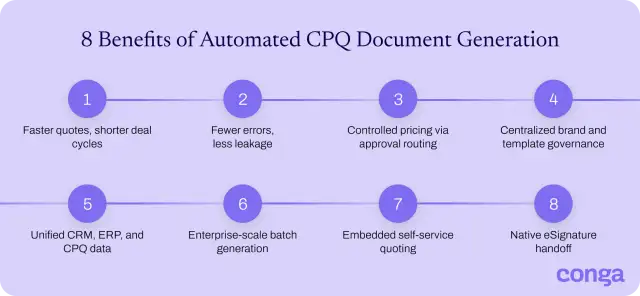
Here are eight ways automated CPQ document generation helps enterprise teams speed up quoting, reduce errors, and scale document processes:
- Faster quote velocity and shorter deal cycles: Documents generate from configured data in seconds. Reps send proposals the same day instead of chasing them days later.
- Fewer manual errors and less revenue leakage: Manual quoting produces errors in nearly 30% of transactions, according to Market Growth Reports. Pulling in approved prices and terms prevents mispriced quotes that quietly erode margin.
- Controlled pricing and discounting through approval routing: Deals that exceed set thresholds automatically route to the right approver. Nothing reaches the buyer until the pricing clears.
- Centralized brand and template governance across teams and regions: Marketing and legal maintain one shared template library. Every region ships on-brand, compliant documents no matter who generates them.
- Unified CRM, ERP, and CPQ data in every document: Account, order, and product data merge from multiple systems into one file. Every quote, contract, and invoice carries the same accurate numbers, with no duplicate entry.
- Enterprise scalability for high-volume, batch generation: An enterprise-scale CPQ document generation solution produces thousands of renewal notices or invoices in a single run. Teams scale volume without adding manual assembly or headcount.
- Embedded self-service quoting through customer portals: Buyers configure options and generate their own quotes inside a portal. That reduces the back-and-forth and accelerates their decisions.
- Native eSignature handoff for faster execution: Completed contracts move straight from generation into an eSignature tool like Conga Sign, so approved deals get signed without leaving the workflow. The whole path from configured quote to signed agreement stays in one continuous flow.
Explore the benefits of document automation.
How CPQ Document Automation Speeds up Proposals and Quotes
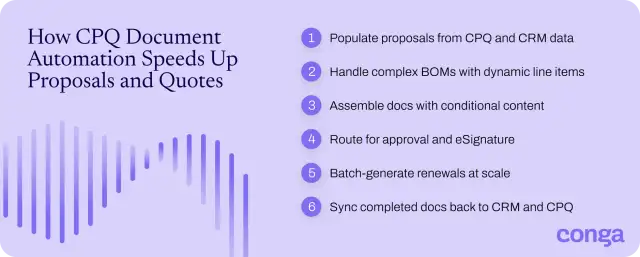
CPQ document automation speeds up proposals and quotes by generating the finished proposal straight from configured deal data, with no manual assembly. It replaces a chain of handoffs with one connected workflow, so quotes don't stall between systems. That sequence runs in six stages:
1. Populating proposals instantly from CPQ and CRM data
When a rep finalizes a configuration, a document generation solution like Conga Composer reads the opportunity's line items, pricing, and account details from your CRM and merges them into a pre-built template. You map each field to its source once, then trigger generation from a button, workflow, or API. Reps don't copy-paste anything, and the numbers on the page match the deal they built. Native CRM and ERP integrations keep the data flowing from your system of record.
Automate document creation with Conga Composer.
2. Handling complex bills of materials with dynamic line-item logic
A configured deal can carry hundreds of components, each with its own price, quantity, and dependency. Dynamic line-item logic renders every valid option through a repeating table that expands to fit, so a 200-line bill of materials (BOM) assembles as cleanly as a three-line quote. You set conditional rules once to:
- Group sub-assemblies
- Apply discounts per item
- Calculate subtotals
- Suppress incompatible options
With those rules in place, the BOM stays accurate without anyone validating the configuration by hand.
3. Assembling documents with rules-based conditional content
Conditional content lets one template serve every deal. You tag each clause, table, or section with a rule tied to a CRM or CPQ field, such as region, product type, or deal size. At generation, the engine reads those rules and keeps only the blocks that apply, dropping the rest. A subscription contract shows renewal terms; a hardware order shows shipping terms. The document is built around each individual sale, so you don't edit anything by hand.
4. Routing for approval and embedded eSignature
You set approval thresholds on discount, price, or non-standard terms, and embed signature tags in the template once. Deals within those limits move straight to signing. Anything outside the pre-defined parameters routes to the right approver first. Once approved, the document opens in an embedded eSignature tool like Conga Sign. The buyer signs right inside your CRM or portal.
5. Running high-volume batch generation for renewals
Renewals don't happen one at a time. When hundreds of contracts expire in a quarter, a time- or event-based trigger runs them as one batch, 90 days before expiration. The document generation engine pulls each account's current terms and pricing, applies the renewal template, and generates all the paper at the same time.
With Conga Composer, for example, you can generate up to 600,000 documents a day, so large renewal portfolios can be processed in a single automated batch without generating each document individually.
Generate thousands of renewals in a single run with Conga Composer
6. Syncing completed documents back to CRM and CPQ
A signed document only matters if it’s reflected in the corresponding record. Once signing is concluded, the generation engine writes the completed file back to its CRM opportunity or CPQ quote, attaches the PDF, and updates the status, close date, and contract value in one pass. Sales, finance, and legal all see the same current version, so forecasting and audits stay clean, and reps don't have to touch a record by hand.
Connect CPQ and Document Generation with Conga
Manual quoting can't keep pace with enterprise deal volume or complexity. CPQ document generation closes that gap, turning configured deal data into accurate, on-brand documents the moment a rep needs them.
Conga Document Automation connects document generation and signing to your CPQ, from end to end:
- Conga CPQ configures and prices the deal upstream.
- Conga Composer merges your CPQ, CRM, and ERP data into Word, PDF, Excel, PowerPoint, or HTML files, launched from a button, workflow, or API with no developer support.
- Conga Sign adds embedded, compliant eSignature, so agreements can be executed inside the systems you already use.
To bring the same connected automation to your quote-to-cash process, contact our sales team.
Run CPQ, document generation, and eSignature on one connected platform.
Frequently Asked Questions
-
Can CPQ document generation handle complex, multi-product quotes?
Yes. CPQ document generation renders multi-product quotes through dynamic line-item logic and conditional content, so bundles, tiered discounts, and hundreds of line items assemble accurately in one document. With Conga Composer, you can build documents from large templates and dynamic tables, so the output stays clean whether a quote carries three line items or three hundred.
-
Is native Salesforce document generation enough for enterprise CPQ needs?
Usually not. Native Salesforce document generation handles basic templates and simple output, but enterprise CPQ also needs multi-format documents, complex conditional logic, high-volume batch runs, and data from systems beyond Salesforce.
Conga Composer covers enterprise needs, generating multi-format documents at high volume from any CRM or ERP, along with embedded eSignature through Conga Sign, while still running inside Salesforce.
See high-volume document generation in action with Conga Composer.
-
How does CPQ document generation support high-volume, enterprise-scale quoting?
CPQ document generation supports high-volume, enterprise-scale quoting by producing documents in batch instead of one at a time. A single time- or event-based run can generate thousands of quotes, renewals, or invoices, each populated with its own data. Conga Composer processes up to 600,000 documents a day, so volume never becomes the bottleneck.
-
How does CPQ document generation speed up the quote-to-cash process?
CPQ document generation speeds up the quote-to-cash process by removing the manual steps between a configured deal and a signed agreement. It automates three stages, so quotes move to signature in one connected flow instead of separate handoffs.
- Document population from CPQ and CRM data
- Approval routing and embedded eSignature
- Signed-copy sync back to your records
Related Resources
-
Checklist: 7 Essential Documents to Automate GuidesCLMChecklist: 7 Essential Documents to Automate
Today’s sales teams waste precious time and resources on repetitive, manual tasks when preparing quotes, proposals, and contracts. In fact, the average sales rep spends only 33% of their time each day actually selling.10/12/20263 min read -
The Million Document Moment: A Guide to Policy, Endorsement, and Renewal Accuracy at Scale GuidesDocument AutomationThe Million Document Moment: A Guide to Policy, Endorsement, and Renewal Accuracy at Scale
Learn how document automation supports large-scale businesses in the most regulated industries.10/05/20263 min read -
Connect and Learn With Peers in the Conga Customer Community BlogCLMConnect and Learn With Peers in the Conga Customer Community
Join 40,000+ peers in the Conga Customer Community—connect, learn, and grow with resources, training, and support to fuel smarter business outcomes.09/30/20266 min read -
The Quote to Cash Process in 10 Steps BlogCLMThe Quote to Cash Process in 10 Steps
Discover how to streamline your quote-to-cash (Q2C) process to accelerate sales cycles, improve customer experience, and boost revenue. This comprehensive guide covers every stage—from configuration and pricing to contract management, billing, and renewals—plus tips for finding the right automation solution. Learn how to eliminate silos, reduce errors, and drive efficiency across your CRM and ERP systems.08/12/20269 min read