CRM Document Automation: Sync Customer Data and Templates
08/31/2026
10 min read

Many teams still build customer documents by hand, copying names, pricing, and terms out of the CRM into templates. Every quote, contract, and invoice made this way can expose the buyer to a typo, an outdated price, or an expired clause.
Not only do those errors erode trust, the manual work required to fix them stalls deals, forces rework, and pulls your best people away from selling. The risk compounds as volume grows. CRM document automation closes the gap by linking these records straight to your templates, so every file is automatically populated with accurate data and routed for electronic signature.
CRM document automation generates business papers from live data
Uses approved templates and workflow rules for consistency
Improves accuracy, speeds sales cycles, and strengthens governance
Conga unifies CRM data, generation, and eSignature in one workflow
What Is CRM Document Automation?
CRM document automation is technology that generates business papers straight from CRM data using preapproved templates and workflow rules. The platform pulls fields such as contact names, account details, products, and pricing from a CRM record, merges them into a template, and produces a finished document in seconds with no manual data entry. Common use cases include quotes, proposals, contracts, invoices, and more.
CRM integration also keeps customer data and workflows connected after the document is generated. Users develop files from a record, trigger creation on a CRM event, route documents for eSignature, sync signature status back to the record, and archive completed agreements.
Six connection points define the common integrations between document automation and CRM systems. Each one removes a step that was previously managed by hand.
| CRM-Document Automation Integration | How It Works |
| Data merge | CRM fields such as contacts, opportunities, products, and pricing flow into document templates. |
| One-click generation | Buttons or actions inside the CRM create documents from a record. |
| Trigger-based automation | A CRM event, such as a deal stage change or record update, triggers document generation. |
| eSignature routing | Generated documents go out for signature and are tracked without leaving the CRM. |
| Status write-back | The CRM record updates with the document status and the signed file. |
| Storage and archiving | Finalized documents are saved to the CRM record or connected cloud storage. |
Benefits of Integrating Document Automation Tools with CRM Business Systems
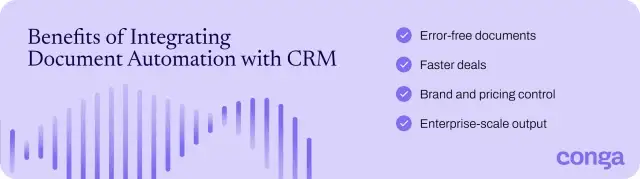
Integrating automation with a CRM connects customer data, document generation, and approval workflows in one system. The payoff shows up in four areas revenue leaders feel directly: accuracy, speed, control, and scale.
- Error-free documents: CRM data merges into every template, eliminating copy-paste errors. Every field traces back to the system of record.
- Faster deals: Unified document generation and eSignature move documents from draft to signature without the handoffs that stall a cycle. Reps create and send from the same CRM record, so nothing sits idle between steps.
- Brand and pricing control: Centralized template governance keeps every document on-brand and on-price. Legal and finance set the rules once, and the platform enforces them on every generated file.
- Enterprise-scale output: Batch generation produces high volumes of accurate papers without adding headcount or slowing revenue teams. Gartner projects that 70% of routine sales tasks will be automated by 2030. Given that document generation ranks among the most repetitive tasks for sales reps, scaling it delivers the clearest return on your automation investment.
Explore more benefits of document automation.
How to Integrate Document Automation with CRM to Sync Customer Data and Templates
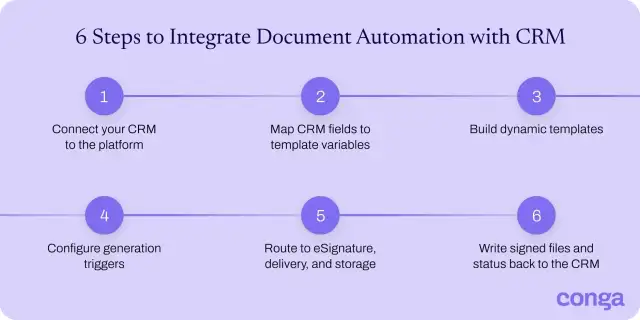
Connecting enterprise document automation to a CRM follows a structured, repeatable sequence that synchronizes CRM fields, templates, triggers, and eSignature into one process. You start by setting up the field mapping and templates once, then the remaining steps run on every deal to generate papers, collect signatures, and write status back to the record in real time.
Work through these six steps to sync customer data and templates from the first connection to the signed file.
1. Connect your CRM to the document automation platform
Start by linking your CRM to the document automation software through a native connector, a prebuilt integration, or an API. Enterprise platforms include managed connectors for common CRMs, and an API-first tool embeds in almost any system of record. Conga Composer, for example, offers a native Salesforce connector plus an API that pulls data from any CRM, ERP, or other platform.
A native connection reads and writes records directly, which keeps data current without a middle layer. During setup:
- Define which CRM objects and fields to sync.
- Set user permissions and field-level access.
- Confirm only approved roles can trigger generation and only approved data leaves the record.
2. Map standard and custom CRM fields to template merge variables
CRM document automation is only as accurate as the mapping behind it. Match each field to a merge variable, which the template will populate when the document is generated. Map three layers:
- Standard fields: Account name, contact, close date
- Custom fields: Renewal date, account tier, SKU-level pricing
- Related objects: Opportunity line items that populate pricing tables, repeating rows, and conditional sections
Name variables and map them once, so every template that shares those fields reuses the same set. Validate against a live record before launch to confirm each mapping returns the correct value, calculations resolve correctly, and no fields are left blank.
3. Build dynamic templates with conditional content and formatting rules
Create one template and let conditional logic adapt it to every deal:
- Conditional sections show or hide clauses based on field values, so a proposal for a government buyer reads differently from one for a commercial account, without creating a separate file for each.
- Dynamic pricing tables add one row per product on the deal and drop any unused rows, so the table always matches the order.
- Calculated fields total quantities, discounts, and taxes automatically.
- Formatting rules apply the right currency, date format, and locale for each buyer's market.
- Locked branding holds fonts, colors, and layout at the template level, so every generated document stays consistent and compliant without manual cleanup.
Conga Composer's features let you build conditional and formatting rules into the template once, so every document shows the right sections, calculates values by business rule, and selects the correct template based on the CRM record.
Learn how to create dynamic template selection in Conga Composer.
4. Configure triggers to generate documents from CRM records
Set the conditions that start each document. A user click covers ad hoc needs, and an automated trigger handles the rest: a deal moving to closed won, a field update, a new record, or a completed approval. Each one names the condition, the template to run, and the record to pull data from.
Add time-based and batch triggers for recurring output, so renewals, invoices, and quarterly reports generate on schedule without anyone opening the record. Test each one of them in a sandbox before launch to confirm it fires once, on the right records, and never on the wrong ones.
5. Route to eSignature, delivery, and cloud storage
Once you generate a document, routing rules move it straight into signing, delivery, or storage. Push it into an eSignature flow with signing order, roles, and authentication set in advance. With Conga Sign, you collect secure, compliant signatures on the generated paper, while automated reminders keep signers moving without manual follow-up.
Documents that only need delivery go out via email, customer portal, or download. You can then store every finished file in a repository such as Salesforce, SharePoint, Google Drive, or Box, so signed documents are never lost or misplaced.
See how Conga Sign takes a document from generated to signed inside your CRM.
6. Push signed documents and status back to the CRM in real time
The generate-and-sign workflow ends where it started: in the CRM. As a signer opens, views, signs, or declines, the platform updates the status fields on the source record in real time, allowing teams to track progress without leaving the system. When signing finishes, the signed file and its audit trail are automatically attached to the account or opportunity.
Real-time write-back keeps the CRM as the single source of truth, so the next step begins automatically without any manual entry. A completed signature can advance the opportunity to closed won, notify the account owner, or trigger billing and fulfillment, so the deal moves forward the moment the buyer signs.
How to Choose the Best Document Automation Tools with CRM Integration
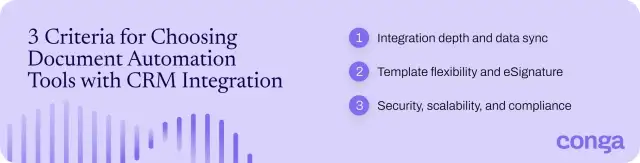
As your tech stack grows, the deciding factor isn’t which tools exist, but which platform integrates with the CRM you already run, supports enterprise workflows, and scales with your business.
To choose the best document automation solution:
1. Evaluate native CRM integration depth and data sync across your systems
Bad CRM data flows straight into every document generated by a lesser tool. Validity found that 37% of teams have lost revenue to poor data quality, and 76% say less than half their CRM data is accurate. Look beyond the word integration on a vendor's site and check:
- How it moves data: Real-time, two-way sync or a scheduled export
- Which fields it reads: Standard, custom, and related objects
- Whether it writes back: Signed files and status to the source record
- Which systems it connects: Most teams run a CRM alongside an ERP and a billing platform
2. Compare template flexibility, conditional logic, and eSignature support
Test the template engine against your messiest document, not a clean demo sample. See if it can:
- Flex one design across products, regions, and deal types with conditional logic
- Handle calculations and repeating tables in the same file
- Let business users build and edit without code
Verify the platform outputs the formats you actually send, from Word to Excel. It should also handle eSignature natively, so a document moves from generated to signed in one flow.
3. Assess security, scalability, and compliance for enterprise volume
Enterprise volume often breaks tools that demo well at small scale. Confirm the platform batch-generates thousands of documents without slowing, and that signed files stay tamper-evident from generation through storage. Check for:
- Encryption and role-based access control
- SOC 2 or ISO 27001 certification
- Signatures that meet ESIGN, UETA, and eIDAS, backed by a defensible audit trail
Ask for volume benchmarks and current certifications in writing. Marketing claims won't hold up in a compliance audit or when production load spikes, and that exposure lands on you, not the vendor.
Sync CRM Data and Document Generation at Enterprise Scale with Conga
Conga runs CRM document automation as one connected workflow:
- Conga Composer merges live data from any CRM, ERP, or system of record, applies your conditional logic and branding, and generates accurate documents in Word, PDF, PowerPoint, Excel, or HTML.
- Conga Sign collects secure, compliant signatures and syncs status back to the record, so generation and signing stay in one place, and legal and finance only have to approve once.
Conga Document Automation is built for enterprise volume. Composer creates more than 10 million documents a month for over 8,000 customers, and our platform runs in 60+ countries, trusted by more than half of the Fortune 50. Time- and event-based triggers handle high-volume batch generation without slowing your revenue teams, and helping every paper stay on-brand, priced to policy, and compliant.
Ready to sync CRM data and document generation at scale? Contact sales.
Turn CRM data into generated, signed documents at enterprise scale with Conga.
Frequently Asked Questions
-
What document types can be generated directly from a CRM?
You can generate any customer-facing document that uses CRM data, including:
- Proposals and quotes
- Contracts, non-disclosure agreements (NDAs), and statements of work
- Invoices and order forms
- Account summaries and quarterly business reviews
- Renewal notices and customer letters
These document types span the full commerce chain, from sales proposals to finance invoices and post-sale renewals, and each generates in Word, PDF, PowerPoint, Excel, or HTML. If a template holds the data, the CRM record populates it.
Explore seven documents worth automating.
-
What data fields from a CRM can be mapped to document templates?
You can map any standard, custom, or related field, such as:
- Contact and account details: Names, titles, email, phone, and billing or shipping addresses on the contact and account records
- Opportunity value, stage, and close date: The deal amount, current pipeline stage, and expected close date from the opportunity
- Product and pricing line items: Each product, quantity, unit price, and subtotal tied to the deal
- Discounts, terms, and renewal dates: Negotiated discounts, payment or contract terms, and renewal or expiry dates
- Custom fields and related-object records: Any field your admin creates, plus data from linked objects such as contracts, assets, or subscriptions
-
How does CRM-generated document connect to eSignature workflows?
A CRM-generated document connects to eSignature workflows by routing straight into the signing tool once the document is generated. Signer order, roles, and authentication are automatically set from the CRM data. The legal document automation platform tracks each status change and writes the signed file and completion status back to the record. With native eSignature such as Conga Sign, generation and signing stay in one flow, so nothing leaves the CRM.
-
How can I automate proposals, quotes, and other customer documents from CRM data?
You can automate proposals, quotes, and other customer documents from CRM data by connecting your CRM to a document automation platform, mapping fields to approved templates, and setting triggers that generate the right document when a record changes. Add conditional logic so one template covers multiple scenarios, then route each document for eSignature and write status back to the original record.
Related Resources
-
The Million Document Moment: A Guide to Navigating Document Complexity and Compliance at Scale GuidesDocument AutomationThe Million Document Moment: A Guide to Navigating Document Complexity and Compliance at Scale
Learn how document automation supports large-scale businesses in the most regulated industries.08/18/202616 min read -
Checklist: 7 Essential Documents to Automate GuidesCLMChecklist: 7 Essential Documents to Automate
Today’s sales teams waste precious time and resources on repetitive, manual tasks when preparing quotes, proposals, and contracts. In fact, the average sales rep spends only 33% of their time each day actually selling.06/23/20263 min read -
Connect and Learn With Peers in the Conga Customer Community BlogCLMConnect and Learn With Peers in the Conga Customer Community
Join 40,000+ peers in the Conga Customer Community—connect, learn, and grow with resources, training, and support to fuel smarter business outcomes.09/30/20266 min read -
The Quote to Cash Process in 10 Steps BlogCLMThe Quote to Cash Process in 10 Steps
Discover how to streamline your quote-to-cash (Q2C) process to accelerate sales cycles, improve customer experience, and boost revenue. This comprehensive guide covers every stage—from configuration and pricing to contract management, billing, and renewals—plus tips for finding the right automation solution. Learn how to eliminate silos, reduce errors, and drive efficiency across your CRM and ERP systems.12/01/20259 min read