CPQ Implementation: 9 Tips to Ensure Success
09/22/2026
12 min read

CPQ implementation affects far more than quote generation. Product configurations, pricing rules, approval workflows, and integrations with CRM, ERP, and CLM all need to work together from the start. When you rush the process or build on incomplete requirements, the result is a tool your team doesn't trust, a burned budget, and a sales process no more efficient than before.
This guide covers nine proven tips for a successful CPQ rollout, the most common challenges, and the best practices for a smooth go-live.
CPQ implementation is the process of configuring your quoting solution to align product catalogs, pricing rules, approval workflows, and business systems so sales teams can generate accurate quotes faster and with fewer errors.
A successful CPQ project depends on clear goals, cross-functional stakeholder alignment, workflow automation, and thorough testing before go-live.
Common CPQ implementation challenges include poor data quality, weak change management, inadequate training, and integration gaps between revenue systems such as CRM, ERP, and CLM platforms.
Conga CPQ helps organizations accelerate deployment through a single data model, native integrations, guided selling, automated approvals, and implementation expertise, enabling faster adoption and measurable business outcomes.
What Is CPQ Implementation?
Configure, price, quote (CPQ) implementation is the process of configuring a CPQ solution to match your unique revenue workflows, from documenting a product catalog and mapping configurations to establishing pricing rules and building approval processes across teams.
Done right, it eliminates manual errors, accelerates quote generation, and aligns every commercial touchpoint. Whether you work with an internal team or a CPQ implementation partner, the approach determines the outcome.
Why You Need a CPQ Implementation Plan First
CPQ has become a core component of the modern revenue technology stack but for most sales teams, it isn't operating like one yet. In Conga's Fragmentation in the Age of AI research report, 45% of respondents said they'd lost a deal in the last six months because quote approvals moved too slowly. Only 7% said deals move smoothly across sales, legal, finance, pricing, and IT — proof that the process, not the team, is where deals lose their pace of opportunity.
A structured CPQ implementation plan is what separates a smooth rollout from a costly one. Without one, projects often stall due to misaligned stakeholders, incomplete product data, and integration gaps that surface too late. A structured approach aligns your teams, defines requirements, establishes realistic timelines, and identifies integration dependencies before you touch a single configuration, protecting your investment and accelerating adoption.
9 Tips for a Successful CPQ Software Implementation
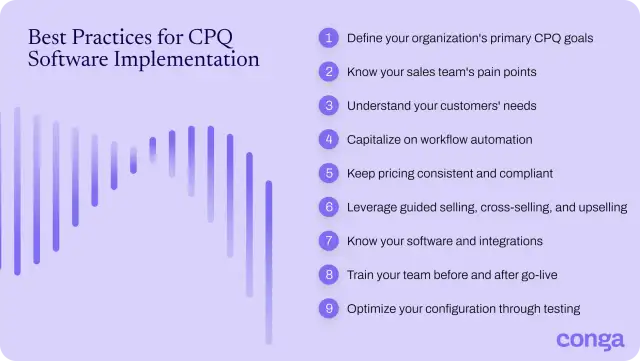
CPQ software implementation depends on careful planning, cross-functional collaboration, and a clear understanding of business requirements. Follow these nine tips to improve adoption, reduce risk, and support long-term success.
1. Define your organization’s primary CPQ goals
To set the foundation for success, it’s essential to identify the key business objectives and goals driving your CPQ system integration. These objectives will inform your implementation process, dictate which stakeholders need to be involved (and when), and establish what steps your teams need to take along the way.
Start by documenting:
- Business objectives and measurable success criteria
- Scope — what CPQ needs to do, and what falls outside it
- Budget and go-live timeline
- Risks, constraints, and major dependencies
2. Know your sales team’s pain points
It’s important to home in on the needs of your sales teams throughout the implementation process, since they’ll be the primary users of your CPQ platform. Before jumping into deployment, design and implementation teams need to consult with the sales reps to understand their most pressing needs and what tools would best serve them.
Start by identifying the existing bottlenecks, inefficiencies, and backlogs sales teams are struggling with. This will help to ensure the CPQ solution has the right features to eliminate their most pressing issues.
3. Understand your customers’ needs
The linchpin to effective selling is knowing your customers through and through, including their needs, behaviors, and pain points. Ask yourself these questions so you can define your customer and CPQ system integration needs:
- What product model best supports customer buying behaviors?
- Do my customers prefer buying bundled services or à la carte offerings?
- Do I need a global implementation strategy to support international users, or is my audience limited to a specific geographical location?
- What dependencies exist that could cause process delays?
4. Capitalize on workflow automation
According to HubSpot's 2024 Sales Trends Report, sales reps spend only about two hours a day actually selling, with the rest consumed by administrative work, data entry, and internal coordination. So automated workflows are a big implementation win.
CPQ can automate many manual sales tasks, including approval routing, follow-up communications, and automated contract renewals, but those workflows need to be documented and configured during implementation to deliver maximum value.
Start by identifying which manual processes create the most friction for your sales team, then build your CPQ configuration around eliminating those first. Conga offers two quoting solutions depending on your product and pricing complexity:
- Advantage CPQ: handle guided selling, pricing rules, discount controls, and subscription management across every revenue stream
- Smart CPQ: built for enterprise-scale complexity, processing 10,000+ line items with AI-driven pricing recommendations and automated configurations
Reduce manual work and accelerate sales productivity with Conga CPQ.
5. Keep pricing consistent and compliant
Pricing errors damage performance, margins, and your company's reputation, and they often trace back to a poorly configured CPQ deployment. During implementation, map every pricing rule, discount tier, and approval threshold before configuration begins. The more thoroughly you document these upfront, the less rework you face after go-live.
6. Leverage guided selling, cross-selling, and upselling
When implementing CPQ, configure your solution to guide reps through the selling process, not a static product catalog. When you build in needs-based question flows, the team can surface the right products, upgrades, and pricing recommendations for each buyer, increasing deal size without adding complexity to the sales process. If you get guided selling right during implementation, your reps never have to choose between speed and accuracy.
Learn how to use upselling and cross-selling to grow revenue.
7. Know your software and integrations
CPQ does not operate in isolation. During implementation, you need to map how it connects to your CRM, ERP, CLM, and other platforms, because poorly planned integrations are one of the most common reasons CPQ rollouts fail.
A single data model with a single set of APIs lets the same catalog and pricing information flow across your entire organization, eliminating inconsistent data across applications and enabling faster scaling. But that only works if the integration layer is designed correctly from the start.
Before configuration begins, establish:
- All systems currently in use and which one will be affected
- The intended CPQ workflow and functionality post-integration
- How systems will exchange data after go-live
Conga CPQ is built to integrate with the platforms your teams already rely on, from Salesforce to ERP to CLM, so you can work smarter, not harder.
Explore Conga integrations.
8. Train your team before and after go-live
Training is non-negotiable for a successful CPQ software implementation. If your team doesn't know how to use the system, they won't use it, and the investment goes to waste.
Build role-specific training into your implementation timeline, not as a final step before go-live, but as an ongoing workstream. Sales reps, admins, and ops teams each interact with CPQ differently, and each needs targeted guidance to get value from day one.
Teams that understand the full capabilities of their CPQ system are the ones that drive adoption, reduce errors, and see the efficiency and revenue gains the implementation was designed to deliver.
9. Optimize your configuration through testing
Poor testing during implementation often creates friction that leads reps to abandon the system. If quotes break, configurations generate errors, or approvals stall, teams are likely to lose confidence and fall back on manual workarounds.
Build testing into every phase of your implementation. Define test cases before each sprint, run negative scenarios designed to break the system, and don't advance until the previous phase passes.
9 CPQ Implementation Challenges That Derail Deployments
Configuration errors, misaligned stakeholders, and poor data governance are the most common reasons for failed CPQ implementation. Here's what to watch for and how to stay on track.
| CPQ Implementation Challenge | Business Impact | How to Avoid It |
| Vague or incomplete goals | No clear success criteria means no way to measure ROI or course-correct mid-rollout. | Define specific, measurable CPQ KPIs and timelines before implementation begins. |
| Neglecting the bigger picture | CPQ becomes a standalone quoting tool instead of part of your revenue lifecycle. | Map how CPQ connects to your full sales, finance, and ops processes. |
| Relying on point solutions | Disconnected tools create integration debt and limit scale. | Choose an integrated enterprise CPQ platform built to grow with your business. |
| Data silos | Inconsistent data across systems leads to quoting errors and broken workflows. | Use a single data model so catalog and pricing information stays synchronized across the organization. |
| Poor data governance | Configuration drift and data quality issues compound over time. | Establish data standards and assign clear ownership before go-live. |
| Ignoring user experience | Adoption is low, teams find workarounds, and the investment is wasted. | Involve sales reps in design and testing to ensure the interface supports how they actually work. |
| Inadequate training | Teams underuse the system and revert to manual processes. | Build role-specific training into the implementation timeline, not just at launch. |
| Not planning for future needs | The system can't accommodate new products, pricing models, or business requirements. | Choose a platform that’s built to scale and validate it against your three-year product roadmap. |
| Underestimating change management | Resistance slows adoption and erodes the business case. | Run a formal change management workstream alongside the technical implementation. |
Best Practices for CPQ Implementation to Accelerate Adoption
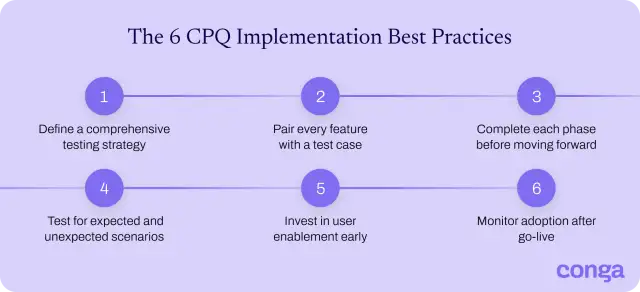
Organizations that prioritize planning, testing, training, and stakeholder alignment are better positioned to drive adoption and achieve long-term value from their investment. Consider these best practices for CPQ implementation:
- Define a comprehensive testing strategy: Establish testing plans, timelines, and success criteria before deployment. Validate configurations, pricing rules, workflows, and integrations before they reach end users.
- Pair every feature with a test case: No feature should be finalized without validation criteria tied to the sales workflow or business requirement. If you can't test it, you're not ready to ship it.
- Complete each phase before moving forward: Don't introduce new functionality until the current sprint passes stakeholder review. Stacked issues compound and become harder to diagnose at go-live.
- Test for expected and unexpected scenarios: For every positive test, run at least two negative cases designed to break the system. This is where configuration gaps, pricing errors, and integration failures actually surface.
- Invest in user enablement early: Provide role-based training and support resources before launch, not after. Well-trained users adopt faster and get more out of CPQ from day one.
- Monitor adoption after go-live: Track usage, feedback, and performance metrics post-deployment. Continuous optimization helps your team address gaps quickly and maximize the return on your CPQ investment.
Implementing CPQ Faster with Conga: Proven Results at Scale
A well-executed CPQ implementation plan requires the right platform behind it. Conga CPQ simplifies the selling of complex products and services on a single data model, with native integrations across CRM, ERP, and contract lifecycle management (CLM) platforms, guided selling, automated approvals, and pricing optimization built in.
The results clients achieve reflect a structured implementation's impact.
- Aspect Software achieved 100% user adoption and cut quote turnaround from six months to less than one day with Conga CPQ.
- AV Flexologic automated its entire quoting process with Conga CPQ, improving accuracy, accelerating sales cycles, and driving revenue growth.
Conga partners with each customer to design an implementation that fits their product catalog, pricing model, and existing tech stack, using an agile framework that keeps deployments on schedule and reduces rework.
Contact us to build a CPQ implementation strategy that fits your business and delivers results from day one.
Accelerate quoting, improve accuracy, and go live faster with Conga CPQ
Frequently Asked Questions
-
How long does it take to implement CPQ?
A CPQ implementation typically takes three to six months, though the timeline depends on product catalog complexity, pricing rules, approval workflows, and the number of system integrations required. Small to mid-sized businesses with standard configurations can go live in six to 12 weeks. Enterprise rollouts with complex multi-currency pricing and multiple integrations can take longer than nine months.
Conga uses an agile implementation framework with defined sprints and stakeholder checkpoints to keep deployments on schedule and reduce rework. Our implementation team and partner network scope the project from day one, so timelines reflect your actual complexity.
Download our CPQ implementation guide.
-
How can I reduce CPQ implementation time?
To reduce CPQ implementation time, start with clean, well-organized product and pricing data before implementation begins. Rationalize your SKUs, document your pricing logic, and map your approval workflows upfront. Involving cross-functional stakeholders early prevents scope creep and approval delays mid-project.
Conga CPQ implementation time is faster due to:
- Pre-built connectors to Salesforce, ERP, and CLM platforms that cut configuration time
- An agile methodology that reduces rework by validating each phase
-
What are the best practices for CPQ and ERP integration?
The best practices for CPQ and ERP integration are:
- Map data flows before configuration begins: Identify exactly how product availability, inventory levels, and pricing updates will move between systems.
- Establish a single source of truth: Assign one system as the authoritative source for each data type to prevent conflicts.
- Use native connectors where available: Native integrations reduce custom development and lower maintenance risk post-go-live.
- Test with positive and negative scenarios: Validate that the integration handles both expected workflows and edge cases before launch.
- Assign post-launch ownership: Designate a team to maintain the integration as product and pricing rules evolve.
-
What are the main reasons for failed CPQ implementation?
The main reasons for failed CPQ implementation include:
- Vague or missing goals: The lack of defined KPIs makes it impossible to measure success or course-correct mid-rollout.
- Poor data quality: An incomplete or inconsistent product catalog produces inaccurate quotes.
- Misaligned stakeholders: CPQ touches sales, IT, finance, and operations. Requirement gaps surface late and create rework when they are not aligned.
- Inadequate training: Teams that don't understand the system revert to manual workarounds, and adoption never materializes.
- Underestimating change management: Resistance to new workflows stalls adoption even when the technical implementation is sound.
- Platform scalability gaps: A solution that can't accommodate future product complexity or lacks native integrations limits long-term value.
-
How can I implement CPQ in manufacturing?
To implement CPQ in manufacturing, start by documenting your full product catalog, including configurable components, compatible combinations, and constraint rules. From there, follow these steps before configuration begins:
- Map your product hierarchy: Identify all product lines, bundles, constraint rules, and BOM requirements upfront.
- Define your pricing model: Document multi-tier pricing, volume discounts, and any customer-specific pricing logic.
- Involve engineering and product teams early: Ensure configuration rules reflect product feasibility before a single rule is built.
- Integrate CPQ with your ERP: Keep inventory, pricing, and product availability synchronized in real time across systems.
- Validate every configuration rule: Run both positive and negative test cases before go-live to surface errors before they reach the sales team.
Explore Conga for manufacturing.
Related resources
-
What Is CPQ? BlogCPQWhat Is CPQ?
What is CPQ? Configure, price, quote (CPQ) software is a tool designed to empower sales, partners, and customers to configure complex products and offerings with efficiency and accuracy. CPQ allows organizations to provide personalized prices and quotes for each customer using codified product and pricing information.09/10/202614 min read -
Connect and Learn With Peers in the Conga Customer Community BlogCLMConnect and Learn With Peers in the Conga Customer Community
Join 40,000+ peers in the Conga Customer Community—connect, learn, and grow with resources, training, and support to fuel smarter business outcomes.09/30/20266 min read -
5 B2B Buying Behaviors You Can’t Ignore BlogCPQ5 B2B Buying Behaviors You Can’t Ignore
Discover the 5 B2B buyer behaviors redefining sales and learn how companies can adapt their sales strategies to win in a buyer-led world.09/18/202611 min read -
Conga Recognized in the 2026 Gartner Peer Insights™ Voice of the Customer for Configure, Price, and Quote Applications BlogCPQConga Recognized in the 2026 Gartner Peer Insights™ Voice of the Customer for Configure, Price, and Quote Applications
Learn more about how customers rate Conga CPQ and our position in the Gartner Peer Insights™ Voice of the Customer: Configure, Price, and Quote Applications report.09/16/20264 min read