CPQ Integration: How to Connect with CRM and ERP Systems
09/17/2026
8 min read

You can build a perfect quote and still watch the deal stall days after the “yes.” Not because the scope changed, but because the data did. If account details live in one system, product rules sit in another, and order processing happens somewhere else, your teams might be retyping, translating, and patching holes by hand.
With configure, price, quote (CPQ) integrations, you bring all your most important workflows together so disconnected systems never cost you a closed deal.
In this guide, we break down why CPQ integrations with customer relationship management (CRM) and enterprise resource planning (ERP) systems matter, how to connect the three tools, and the criteria to weigh in when evaluating vendors.
CPQ integrations connect configure, price, quote software with other systems, such as CRM and ERP, so that deal data, pricing logic, and order records move between sales and operations.
To integrate CPQ with ERPs and CRMs, you need to audit data, designate a system of record, sync pricing and configuration logic, deploy connectors, automate quote-to-order, and align sales with operational fulfillment information.
Conga CPQ offers all the connectors you need to keep your revenue stack in sync through native Salesforce integration and APIs for other systems.
What Is a CPQ Integration?
A CPQ integration is the connection between your configure, price, quote software and other systems that hold your deal data, such as your CRM and your ERP. Integrated sales tools allow records to flow through each solution, working with the same account records, product catalogs, pricing rules, and order information.
Without ERP and CRM integration, manual work piles up in the gaps. Your sales rep pulls account details from the CRM, rebuilds the configuration in CPQ, then waits while someone rekeys the order into the ERP.
Every handoff is a chance to mistype a price, quote a discontinued SKU, or lose track of where the deal stands, which is why more revenue teams connect the quoting process to the systems on either side of the deal.
Why Your CPQ Should Integrate with CRM and ERP Systems
A standalone CPQ tool speeds up one step: the quote. An integrated one speeds up everything after it. When a finished negotiation flows straight into CRM and ERP, the order, fulfillment, and invoice move without anyone rekeying the data, so the whole quote-to-cash process is faster, cutting the time between a signed quote and collected payment. The difference shows up in cycle time, margin discipline, and how often sales and finance argue about the same order.
With an integrated CPQ, you:
- Eliminate disconnected data chaos and establish a unified system of record for accounts, products, pricing, and deal terms across quoting and order execution.
- Accelerate deal momentum and shorten sales cycles, a goal supported by a Market Growth Reports survey showing 78% of companies using CPQ cut quote turnaround time by more than half.
- Enforce configuration guardrails and protect margins by blocking invalid bundles, out-of-policy discounts, and unsupported terms before sending quotes.
- Sync real-time pricing signals and inventory accuracy, so reps quote what you can actually deliver, at the ideal price and currency for the right accounts.
- Automate cross-functional approvals and the quote-to-order handshake, so sales, finance, and ops teams work from the same approved record.
- Trigger operational fulfillment via automated sales orders and bills of materials (BOMs) to eliminate rebuilding complex orders by hand.

How to Integrate CPQ with CRM and ERP Systems: 5 Steps to Connect Sales and Finance
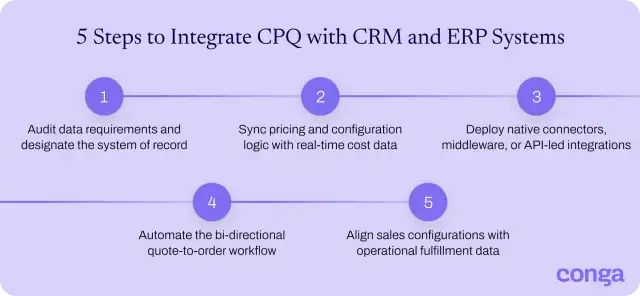
A successful CPQ integration gives every team a single source of truth: agreed ownership of pricing data, a clean data model before connectors go live, and a quote-to-cash handoff that runs automatically. These five steps show you how to build that foundation.
1. Audit data requirements and designate the system of record
When two systems claim the same record, you get conflicting truths and constant manual reconciliation. Map every data object the quote touches:
- Accounts
- Products
- Price books
- Discount rules
- Opportunity stages
- Order records
- Payment terms
For each one, name the system of record. CRM usually owns account and opportunity data. Products, inventory, and orders stay within ERPs. CPQ handles configuration rules and approval logic. Document the source of truth assignment and share it with every team involved.
2. Sync pricing and configuration logic with real-time cost data
Pricing logic split across systems leads to margin erosion. When ERP holds the list price, CRM holds account-level negotiated rates, and CPQ runs the calculations the seller sees, the systems drift without a sync. Sales reps then quote against stale data.
A working CPQ-ERP integration pulls cost, list price, and tier data from ERP into CPQ in near real time, then applies AI price optimization and suggested pricing, along with configuration rules, contractual agreements, and discount guardrails on top. Reps then see the right floor pricing the moment they configure a bundle.
3. Deploy native connectors, middleware, or API-led integrations
CPQ integration gets much easier when you count on native connectors, middleware, and APIs. According to Informatica, building a data pipeline—the automated path that moves records from one system to another—from scratch can take up to 12 weeks. Connectors get the work done faster.

Pick the integration approach based on the CPQ technology stacks involved, the volume of records, and how custom your ERP is. Your options are:
- Native connectors: pre-built integrations between CPQ and a specific CRM or ERP that you configure rather than code. Use these when you run mainstream platforms like Salesforce, Microsoft Dynamics 365, SAP, or Oracle.
- Middleware (iPaaS): tools that orchestrate flows across multiple systems. Choose middleware integrations when you have three or more endpoints, complex transformation logic, or a long-term plan to add adjacent systems.
- API-led integration: direct connections between CPQ and target systems, typically managed as services. Pick APIs when you need custom logic, you have a heavily customized ERP, or a connector doesn’t exist.
For most tech stacks, CPQ Salesforce integration uses native embedding, while ERP connectors run through middleware or APIs. Leading CPQ platforms with CRM and ERP integrations like Conga also support hybrid approaches.
Explore Conga’s native integrations with your CRM and ERP.
4. Automate the bi-directional quote-to-order workflow
A bi-directional quote-to-order workflow means data transits both ways:
- CPQ to ERP: configured quotes flow out with line items, options, pricing, and account terms intact, triggering order creation without manual rekeying.
- ERP and CRM back to CPQ: order status, shipment data, and invoice information return to the record, so your team has full visibility through fulfillment.
That return path is what makes bi-directional worth the build. A one-way push just rebuilds the same silo on a different system: sales hands the order off and loses sight of it, and forecasting drifts the moment a shipment slips or an invoice changes. Keep the loop closed, and the same order record stays accurate in both systems through fulfillment.
See how a closed quote turns into a synchronized order in a single click with Conga CPQ
5. Align sales configurations with operational fulfillment data
Configurations in CPQ need to reference real ERP records. SKUs that actually exist, bills of materials that production recognizes, and provisioning data that services can execute against.
Follow these steps to align your sales configuration with operational fulfillment data:
- Map CPQ product objects to ERP master records: establish a single, flexible data model where every configured item references verified master records, ensuring that product information, active SKUs, and contractually negotiated pricing flow throughout direct and digital channels.
- Automate the generation of BOMs and routings: use a constraint-based configuration engine that automatically creates BOMs and manufacturing instructions as soon as someone builds a quote, eliminating manual backend modifications and order-engineering delays.
- Synchronize subscription lifecycle events with automated billing frameworks: connect complex subscription ramps, asset amendments, and recurring rate plans to downstream billing engines via integrations, allowing contract-specific terms to automate invoicing schedules without manual data entry.
Conga lines up your commerce with an end-to-end platform that offers CPQ, price optimization, and contract lifecycle management.
How to Evaluate CPQ Integrations: Key Criteria for Enterprise Buyers
Six criteria separate enterprise-grade CPQ integration from a connector that looks good in a demo. Score each vendor against these features before signing.
| CPQ integration feature | How to evaluate CPQ integration capabilities | Business outcome |
| 1. Platform-agnostic connectivity | Confirm connectors for Salesforce, Microsoft Dynamics 365, SAP, Oracle, and NetSuite, plus open REST APIs for everything else. | One CPQ that fits the systems you have today and the ones you may adopt in the future. |
| 2. Pricing intelligence | Test whether the platform pulls live cost data from ERP, applies tiered discount guardrails, and surfaces margin impact at the line item. | Sellers quote at the right floor price without finance intervention. |
| 3. Native lifecycle alignment | Verify the CPQ connects to contract lifecycle management and billing without custom code. | Quote, contract, order, and renewal share one record, so the account team doesn’t need to stitch data together. |
| 4. Configuration performance | Run a worst-case bundle through the configurator in a live demo, then time the quote generation. | Reps generate accurate quotes during the customer call, not after. |
| 5. Operational synchronization | Confirm bi-directional sync for orders, fulfillment status, and invoices. | Sales sees what operations sees thanks to one consistent record. |
| 6. Scalability and governance | Ask for documented support for multi-entity, currency, and region deployments. | The integration holds up as deal volume, geographies, and product lines grow. |
With implementation in order, keep track of CPQ KPIs to evaluate the performance of your new tool.
Scale Faster with Conga’s Integrated CPQ Platform
Conga CPQ removes the friction between selling and fulfilling. Our platform embeds natively in Salesforce and Microsoft Dynamics 365 and connects to major ERP systems through out-of-the-box connectors, with open APIs for everything else.
Here's what you get with Conga CPQ:
- Automated ERP synchronization: eradicate manual product data entry and speed up production processing by automatically generating and submitting BOMs and manufacturing routings directly to your ERP.
- Omnichannel consistency: cut the friction of legacy system integrations with open APIs and a software development kit (SDK) to extend the CPQ engine and single product catalog into your commerce chain.
- Embedded signature with Conga Sign: accelerate contract finalization and protect your revenue with legally binding electronic signatures in the configuration cycle.
To map your CPQ, CRM, and ERP stack against an integrated revenue plan, contact our sales team.
Line up your CPQ, ERP, and CRM with Conga’s native integrations
Related Resources
-
Smarter Decisions. Faster Execution. Connected Commerce. BlogIndustry InsightsSmarter Decisions. Faster Execution. Connected Commerce.
Explore the Conga October 2026 release: AiMe and MCP Server, AI-powered CLM, Time Series Forecasting, AI template generation, and deal-level CPQ pricing controls.10/14/20268 min read -
The Million Document Moment: A Guide to Navigating Document Complexity and Compliance at Scale GuidesDocument AutomationThe Million Document Moment: A Guide to Navigating Document Complexity and Compliance at Scale
Learn how document automation supports large-scale businesses in the most regulated industries.08/18/20262 min read -
AiMe: The Intelligence Layer for Modern Commerce BlogAIAiMe: The Intelligence Layer for Modern Commerce
Meet AiMe, Conga's AI intelligence layer for contracts, pricing, quoting, and documents, now available in Copilot and Claude through MCP.10/14/20267 min read -
Conga Composer October 2026 Release: Easier Document Automation BlogDocument AutomationConga Composer October 2026 Release: Easier Document Automation
Explore the Conga Composer October 2026 release: AiMe Template Generator, a prebuilt Document Merge UI, a guided Solution Manager, and Composer API event notifications.10/14/20268 min read